Invoice Generator for Freelancers
Turn completed work into a clear, professional invoice without wasting time formatting documents. MakeInvo helps freelancers list projects, hours, rates, expenses and payment terms, then generate a client-ready PDF invoice.
Useful for developers, writers, marketers, virtual assistants, creatives, and independent professionals worldwide.
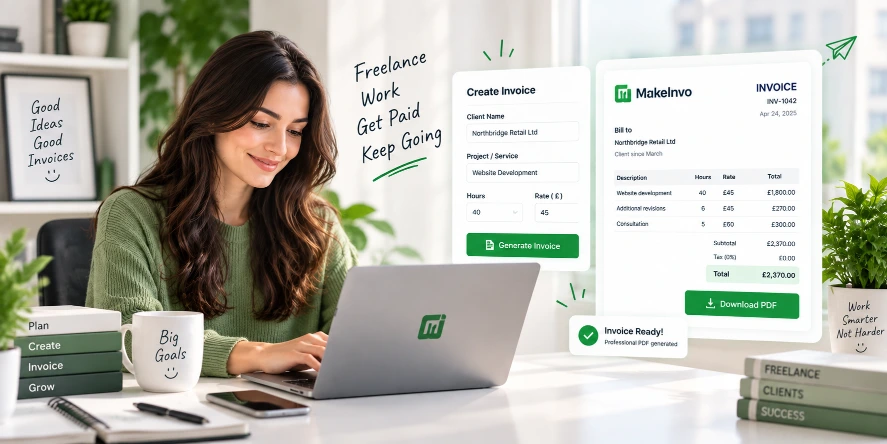
Freelance invoicing should not take longer than the work
Most billing mistakes happen when you try to bend rigid word processors and generic spreadsheets into fiscal ledgers. Every extra click is billable time lost.
Independent contractors spend hours wrestling formatting bugs, calculating fractional VAT rates, and combing sent mail folders to confirm payment terms.
Starting from scratch every time
Re-formatting templates in Google Docs or Word with delicate table lines that shift unexpectedly whenever you paste notes.
Missing critical client details
Omitting mandatory PO numbers, registered legal addresses, or VAT identification, triggering instant rejection by corporate AP teams.
Clashing rates & deliverables
Conflating day rates with flat-fee project deliverables, confusing accounting departments and stalling your cash transfer.
Scattered client accounts
Hunting down scattered PDFs on personal laptops without a unified record of who has paid and whose balance is outstanding.
Awkward post-due chaseups
Having to craft delicate reminder emails without crisp date-stamped records or clear net-term penalty disclosures.
Duplicate & broken numbering
Accidentally sending two clients INV-004, causing bookkeeping confusion and audit compliance flags down the line.
Keep freelance billing clear and consistent
A structured framework designed specifically for independent contracts, agile retainers, and multi-tier deliverables.
Hourly & Fixed on One Bill
Add hourly or fixed-price services on the same invoice, with quantities, hourly rates, and unit measures you control with total precision.
Discrete Line Items
Separate multiple project deliverables into their own clear line items instead of burying your value under one ambiguous grand total.
Dedicated Expenses
Add hardware, software passes, or transit as their own distinct line items, so a client can see exactly what they are reimbursing.
Defined Due Dates
Set unambiguous Net-7, Net-14, or Net-30 payment terms so settlement expectations are never left to guesswork.
Repeat Client Memory
Save recurring corporate tax identifiers, billing contacts, and banking routes once you register, avoiding manual re-entry.
Direct Vector PDF Export
Download a clean, crisp, print-ready vector PDF document the instant your draft is confirmed, compliant with document engines.
What to include on a freelance invoice
A quick reference checklist of elements required by enterprise accounts teams and independent tax authorities.
Your Freelance Brand Name
Legal name or registered trading DBA.
Complete Contact Details
Email, phone, and legal business address.
Client Billing Address
Company legal entity and attention contact.
Unique Invoice Identifier
Sequential numbering format (e.g. INV-1042).
Issue Date
The explicit day services were formalized.
Definite Due Date
Clear target deadline for remittance.
Scope & Deliverable Spec
Readable summary of tasks performed.
Quantity, Hours & Rate
Standardized unit multiplication metrics.
Tax & VAT Disclosures
Explicit statutory tax rate or 0% reverse charge.
Reimbursable Outlays
Documented direct project expenses.
Gross & Net Totals
Clear bottom-line figure in chosen currency.
Payment Instructions
IBAN, BIC/SWIFT, ACH routing, or payment link.
MakeInvo automatically standardizes these structural blocks on export to eliminate human billing oversight.
Create a freelance invoice in four steps
From contract milestone completion to downloadable PDF in under two minutes.
Add your details
Enter your professional details, contact information, and your client's billing coordinates with zero form overhead.
List the work
Add your project phases, log recorded hours, attach reimbursable expenses, or bill agreed milestone charges.
Check the totals
Review automatically calculated sub-totals, applicable tax rates, discounts, and payment terms before dispatch.
Download the PDF
Generate and instantly download a beautiful, crisp, print-standard client-ready PDF directly to your device.
Built around real freelance workflows
Engineered specifically to solve the real quirks of modern remote contracting and client billing.
Hourly and Project Billing
Easily combine billable timesheet hours with fixed deliverables without requiring two separate invoice documents.
Saved Client Details
Store recurring client profiles securely. One tap loads their registered VAT registration, attention tags, and mailing address.
Professional PDF Invoices
Flawlessly rendered vector PDFs ready to email or upload to accounts portals, retaining sharpness at any zoom level.
Multiple Currencies
Bill in USD, EUR, GBP, CAD, AUD, or dozens of worldwide denominations with proper localized currency symbols.
Clear Payment Terms
Pre-populate standard freelance late fee clauses, deposit release milestones, and remittance account coordinates.
Central Invoice History
Search, filter, and re-download any invoice you've ever produced. Never lose track of what you billed on past projects.
What a freelancer invoice can look like
An illustrative example — your invoice will reflect your own business, client, deliverables, and chosen currency.
Alex Morgan
Studio 4B, The Old Granary
London, E2 8AA
alex@morgan-code.co.uk
Northbridge Retail Ltd
Attn: Claire Henderson, Head of Digital
72 Commercial Road, Bristol, BS1 6TG
VAT ID: GB 984 2190 44
E-Commerce Checkout Redesign & API Pass
PO Reference: PO-88914
| Description | Hours / Qty | Rate | Amount |
|---|---|---|---|
Frontend Architecture Sprint Next.js 15 migration & responsive checkout components | 23 hrs | £80.00 | £1,840.00 |
Payment Gateway API Webhooks Stripe webhook idempotency handling and tax logic | 8 hrs | £80.00 | £640.00 |
Production SSL & Staging Server Setup Direct hosting outlay reimbursable | 1 fixed | £128.00 | £128.00 |
Freelance invoicing tips that reduce confusion
A compact magazine-style guide to getting paid on time without awkward client friction.
Invoice immediately on milestone completion
Don't wait for month-end. Fresh deliverables get approved and settled far faster than aged requests.
Always specify the client's PO number
Finance teams will quarantine any invoice that lacks an internal matching purchase order reference.
Clearly separate expenses from time
Highlight software or transit purchases on distinct rows so company tax write-offs are instant for accounts.
Use precise dates rather than Net terms only
Writing "Due: 24 October 2026" works significantly better than ambiguous "Net 30" wording.
Provide clear electronic payment links
Include IBAN, sort codes, or instant payment links directly in the footer note to avoid remittance lag.
Send PDF format exclusively
Never email editable spreadsheets or Docs that can be inadvertently altered during internal forwarding.
Establish sequential numbering from day one
Pick a structured cadence like INV-2026-001 so both you and tax authorities can audit completeness easily as your revenue accelerates.
Explore tailored billing solutions
MakeInvo maintains specific configurations tailored to the nuances of every professional service discipline.
Invoice Generator for Designers
Tailored for Figma mocks, revision rounds, brand identities, and commercial asset licensing.
Invoice Generator for Photographers
Built for half-day rates, equipment rentals, studio fees, and image licensing rights.
Invoice Generator for Self-Employed
Designed for sole traders who need straightforward billing without the complex accounting bloat.
Frequently asked questions
Everything you need to know about generating freelance invoices on MakeInvo.